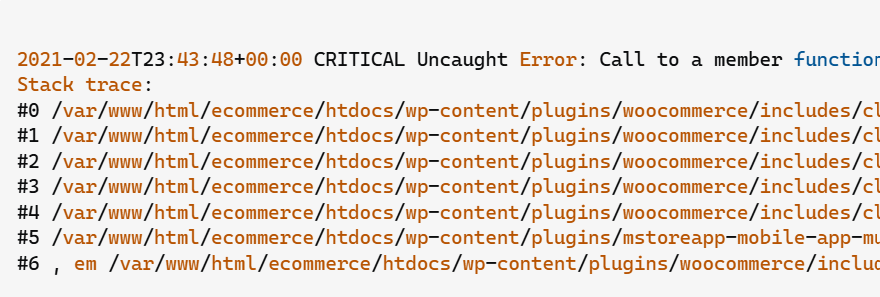
It is the absolute worst nightmare for any e-commerce store owner: a customer is on the checkout page, credit card in hand, ready to hit buy—and the entire website crashes into a blank white screen with a “critical error” message.
When you check your server logs, you find this exact technical error string. The standard advice on generic forums is to “deactivate all your plugins” or “reinstall WooCommerce.” That is terrible, lazy advice that forces your business into unnecessary downtime.
Below is the real root cause of why this crash happens and the exact, code-level solutions to fix it forever based on how the error is being triggered on your backend.
The Error Snippet
When your checkout page or AJAX add-to-cart script crashes, your server’s error_log or your WordPress recovery email reveals this precise trace:
Plaintext
PHP Fatal error: Uncaught Error: Call to a member function get_cart() on null in /wp-content/themes/your-theme/functions.php:36
Stack trace:
#0 /wp-includes/class-wp-hook.php(324): your_custom_cart_function()
#1 /wp-includes/class-wp-hook.php(348): do_action('init')
Why This Happens (The Real Technical Cause)
WooCommerce does not load its session data, customer cookies, or the shopping cart object on every single background request. By default, the WC()->cart object is only initialized on front-end requests after core plugins have completely loaded.
This fatal error occurs because a third-party plugin (like an AJAX Quick Buy, custom checkout field customizer, mini-cart widget, or a REST API endpoint) is trying to fetch cart data via WC()->cart->get_cart() too early in the WordPress execution cycle (such as directly inside an init or rest_api_init hook) before WooCommerce has actually built the cart instance. Because the cart object does not exist yet, the system returns null, causing an immediate crash.
How to Fix It Safely (Step-by-Step Solutions)
Depending on whether this error is coming from your active theme’s functions.php file or an external API/plugin integration, use the appropriate high-level technical fix below.
Fix 1: Wrap Theme and Plugin Functions with a Defensive Check
If the error is originating from a custom code snippet in your theme’s functions.php file or a child theme asset trying to count cart items or display a mini-cart, you must add a defensive conditional check to ensure the backend hook doesn’t execute when the cart is missing.
Replace your problematic cart call with this structured fallback logic:
PHP
function techbic_safe_cart_retrieval() {
    // 1. Ensure we are not on the WordPress admin dashboard backend
    if ( is_admin() ) {
        return;
    }

    // 2. Defensive Check: Ensure the main WC instance and cart object are fully built
    if ( ! function_exists( 'WC' ) || is_null( WC()->cart ) ) {
        return;
    }

    // 3. Run your cart contents loop safely now
    $cart_items = WC()->cart->get_cart();
    if ( ! empty( $cart_items ) ) {
        foreach ( $cart_items as $cart_item_key => $cart_item ) {
            // Your custom layout logic goes here safely
        }
    }
}
add_action( 'wp_head', 'techbic_safe_cart_retrieval' );
Fix 2: Explicitly Force-Load the Cart on REST API and Custom Hooks
If you or a plugin developer are building custom mobile app integrations, headless checkouts, or custom endpoints using rest_api_init, the cart is natively hidden by WooCommerce to save server memory. You must force WooCommerce to initialize the customer session and pull cart items from the database manually.
Use this sequence inside your custom API endpoints or custom AJAX callbacks:
1.Validate core WooCommerce paths:Step 1.
Before running any code, verify that the core application constants are accessible to prevent script hijacking or unauthorized file calls.
defined( 'WC_ABSPATH' ) || exit;
2.Force-initialize the missing global cart object:Step 2.
If WC()->cart evaluates to null, run the native helper function to spinning up customer sessions, database handlers, and empty structures.
if ( is_null( WC()->cart ) ) { wc_load_cart(); }
3.Pull the active user’s existing checkout session:Step 3.
wc_load_cart() initializes a blank container. To actively pull what items the customer actually has inside their current checkout cookie, trigger the session retrieval method immediately after.
WC()->cart->get_cart_from_session();
4.Execute the final get_cart() action safely:Step 4.
Now that the instance is running and populated with the customer’s data, you can safely query the properties without risking a crash.
$final_items = WC()->cart->get_cart();
Pro-Tip for Live Debugging: If this crash suddenly started after installing a plugin but you cannot access your dashboard to turn it off, don’t delete your entire database. Simply log into your server via FTP, navigate to
/wp-content/plugins/, and append-disabledto the folder name of your newest checkout or payment plugin. This bypasses the code loop and restores live checkout instantly.