Few things match the frustration of spending hours meticulous crafting a perfect website layout, clicking save, and watching the builder freeze before displaying a vague warning: "An error occurred while saving your page." The loading circle turns red, your latest design modifications fail to commit to the database, and navigating away risks corrupting your entire active layout schema.
Standard Divi support channels often blame third-party plugins or tell you to re-install your theme. This is unhelpful. This error indicates a strict server infrastructure bottleneck where the massive database payload generated by Divi’s layout engine is choking your server’s backend processor during the saving handshake.
Below is the deep-tech cause of this saving timeout and the exact server-level modifications needed to safeguard your design pipelines.
The Error Snippet
When Divi fails to push design configuration frameworks to your site backend, your browser’s web developer console (Network tab under Admin AJAX requests) or your server’s error_log will capture variations of this operational timeout:
Plaintext
POST https://techbic.site/wp-admin/admin-ajax.php 403 (Forbidden)
OR
PHP Fatal error: Maximum execution time of 30 seconds exceeded in /wp-includes/wp-db.php on line 2140
Why This Happens (The Real Technical Cause)
Divi works by translating your visual layout adjustments into an intricate, massive tree structure of shortcodes and layout metadata arrays. When you hit save, the builder packages this entire payload into a single, comprehensive administrative POST request directed at admin-ajax.php.
This saving failure triggers due to two specific backend architecture limitations:
- The Apache/Nginx Request Body Ceiling: Modern security firewalls (like
mod_security) or restricted server parameters (likemax_input_varsorupload_max_filesize) inspect the payload size. If your layout contains heavy nested text rows, embedded styling properties, or multi-row configurations, the payload size can exceed the server’s input parsing limit. The server prematurely terminates the connection mid-stream, corrupting the layout array strings inside the database. - PHP Script Execution Exhaustion: By default, many hosting providers cap script processing loops at a restrictive threshold of 30 seconds. If your layout is large, the database engine takes longer than 30 seconds to update all individual post-meta rows. The server forcefully drops the script execution right during the write loop, resulting in a save timeout.
How to Fix It Safely (Step-by-Step Solutions)
Follow these direct technical steps to scale up your server processing variables and ensure smooth database writing operations.
1.Expand Input Limits and Script Runtime in php.ini:
Step 1.
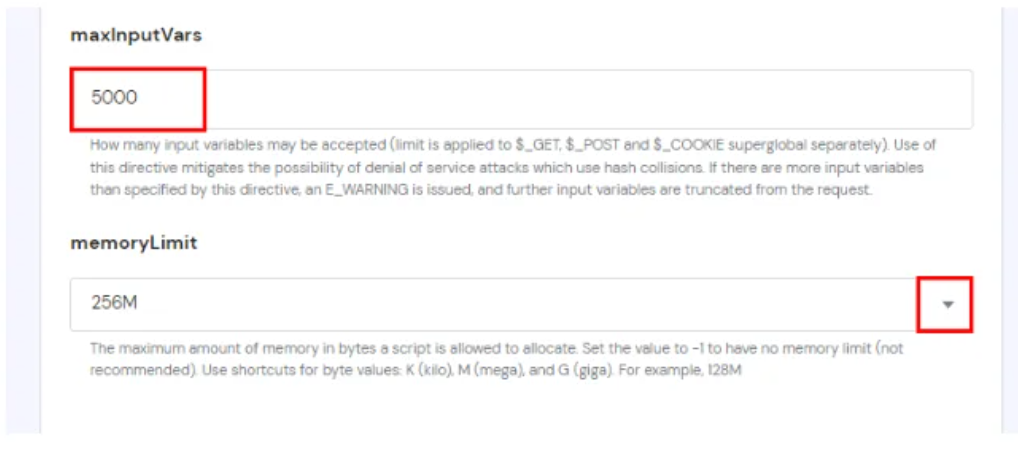
Log into your hosting server environment using FTP or an online File Manager. Navigate to your root directory and open or create your custom php.ini (or .user.ini) configuration file. Adjust the values to match these enterprise baselines to prevent string truncation:
Ini, TOML
max_input_vars = 5000
max_execution_time = 300
post_max_size = 128M
upload_max_filesize = 128M
memory_limit = 512M
2.Force Runtime Extension via .htaccess (For Apache Servers):
Step 2.
If your server architecture ignores custom .ini modifications, you can inject the instructions directly into your Apache configuration coordinator. Open your .htaccess file and insert these directives at the very top:
Apache
php_value max_input_vars 5000
php_value max_execution_time 300
php_value post_max_size 128M
3.Cleanse and Optimize Database Layout Revisions:
Step 3.
Sometimes, the database table responsible for storing your layout updates (wp_posts) accumulates hundreds of stale autosave revisions, causing save requests to bloat. Open your wp-config.php file and append this optimization directive to cap layout clutter:
PHP
define( 'WP_POST_REVISIONS', 5 );
4.Verify Apache Security White-listing Rules:
Step 4.
If the builder throws a direct 403 Forbidden error on save despite lifting your PHP configurations, your hosting firewall (mod_security) is likely misinterpreting Divi’s massive shortcode payload as a malicious script injection. Contact your server administrator or open your hosting dashboard security options and temporarily whitelist or exclude the admin-ajax.php pathway from active security inspection rules.